Behind the scenes · this site
How this room
was built
The top of this site is a photo that looks back at you. There’s no 3D engine, WebGL or animation library: just a set of generated frames, cut out with Apple’s Vision framework, and a room lit entirely with CSS.
The brief
I wanted a portfolio that makes a hiring manager smile in the first second and still gets out of the way. Out of five directions (a video call, an IDE, a magazine cover, a tiny desktop OS and a warm room), I picked the room: me at a walnut desk in golden-hour light, turning to look at wherever your cursor goes.
One portrait, many frames
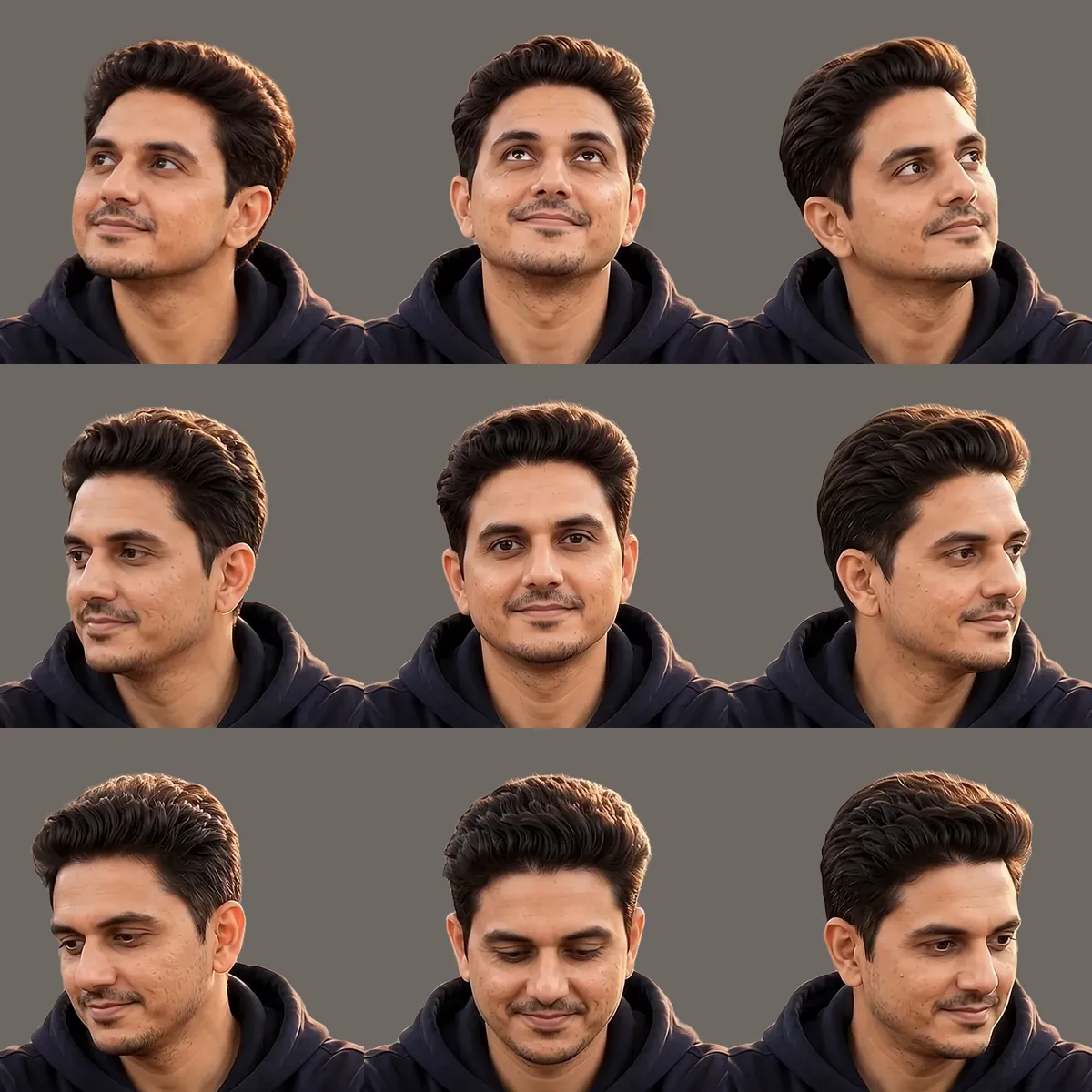
Everything starts from a single portrait. From it, image and video models generated the same scene with my head turned in each direction, plus a short clip of me blinking. Every frame had to share the exact framing, desk and light, or the illusion breaks the moment the head moves.
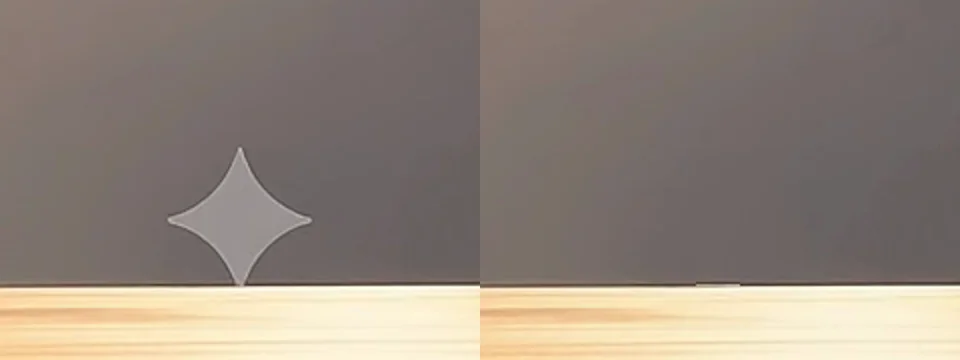
Every generated frame also came with a small sparkle watermark in the corner, sitting right on the desk’s edge. Removing it took two steps in ffmpeg: copy a clean strip from beside the sparkle’s tip so the desk line stays straight, then let delogo fill in the rest from the surrounding wall. The first attempt left a one-pixel notch: the desk edge rises a pixel toward the right, so the strip has to come from the left.
Cutting out the person and the desk
To paint my own wall and light, the subject had to come out of the photo. Apple’s Vision framework does person segmentation on-device, but a desk isn’t a person. So a small Swift tool finds the desk’s back edge in each frame, keeps everything below it, and merges that with the person mask. A flood fill then plugs the see-through gaps between arms and body. All the blink frames share one mask, so the outline can’t flicker.
The lighting baked into the photo stays. Instead, the new wall behind me is painted to agree with it: warm light from the upper right, and a soft shadow thrown to the left.

Looking at you
The page measures the angle and distance from my face to your cursor. Close to the face, I look straight ahead. A little further out, I turn halfway in one of eight directions. Further still, I turn fully in one of sixteen. That’s 25 head poses in all.
Generated frames drift in small ways: hands re-clasp, drawstrings swing. So the body is one permanent image, and only the head and neck are swapped in through an SVG mask that fades into the collar. Poses switch instantly. A crossfade sounds smoother, but halfway through it you briefly see two heads.
Blinking, and doing nothing
The generated blink was wrong in a very human-noticeable way: eyes shut for about 0.3 seconds, then they never quite reopened. The fix was to pick five frames (open, closing, shut, opening, open) and play them in 240 milliseconds, revealed through a soft eyelid-only mask so nothing else on the face moves.
Leave the cursor alone for four seconds and I start living a little: mostly blinking, sometimes a short glance to the side, then back to you. Any movement cancels it instantly.

Light, night and scroll, all in CSS
One animation loop eases your cursor position into two CSS variables. The window light, the sun glow, my shadow and the night-time desk lamp all read those variables and move with transforms only, so the browser never has to re-lay out the page. Day and night are colour tokens registered with @property, which lets the whole room fade between them instead of snapping.
Below the room, the day carries on: each section is a later hour, from late afternoon to night. Things rise into place as you scroll using the browser’s own scroll-driven animations. Browsers that don’t support them simply show the finished page.
/* the whole scroll reveal: no JavaScript */
@supports (animation-timeline: view()) {
  .reveal {
    animation: reveal linear both;
    animation-timeline: view();
    animation-range: entry 0% entry 80%;
  }
}
@keyframes reveal { from { opacity: 0; translate: 0 48px; } }
What didn’t make it
- A head-turn video, played frame by frame. I generated a ten-second clip looking in every direction and stepped through 44 of its frames toward the cursor. On paper it was smoother. In practice it looked unnatural, so it went.
- Crossfades between poses. Two heads for a split second.
- A generated smile. It looked like someone else’s smile.
The lesson I keep relearning: with a face, “technically smoother” loses to “feels human”. The illusion lives in small, honest details, not in more frames.